Tour: The sidebar
Your map of the realm. Every group and budget lives here.
The sidebar is the list on the left of the window, shown here signed in.
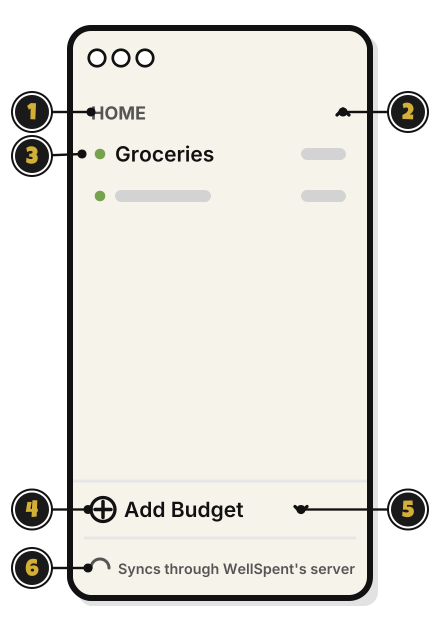
- HOME: a group, in capital letters. Right-click it for its menu.
- The arrow: hides or shows the group’s budgets. It points up while they show.
- Groceries: a budget, with what’s left beside it. Click it to open its page.
- Add Budget: make a budget. Quest 4
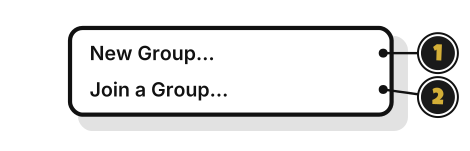
- The small arrow: opens a menu with New Group… and Join a Group…
- Syncs through WellSpent’s server: you’re signed in. Signed out, it says Kept on this computer only, with Sign in.
A group’s menu
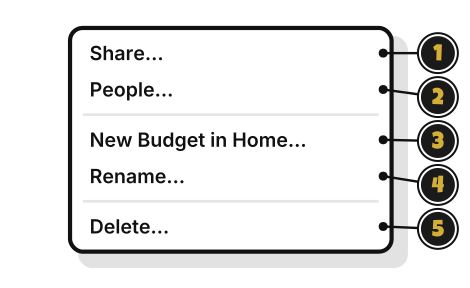
- Share…: invite someone to the group. Quest 7
- People…: see who’s in the group, and what each person can do.
- New Budget in Home…: make a budget in this group.
- Rename…: change the group’s name.
- Delete…: delete the group and everything in it. It asks first. Someone who joined a group sees Leave… here instead.
A budget’s menu
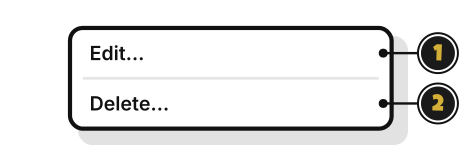
- Edit…: change the budget’s name, or how much a month.
- Delete…: delete the budget and its transactions. It asks first.
The menu beside Add Budget