Tour: A budget’s page
Every good quest starts with a look at the map.
Click a budget in the sidebar, and its page opens on the right.
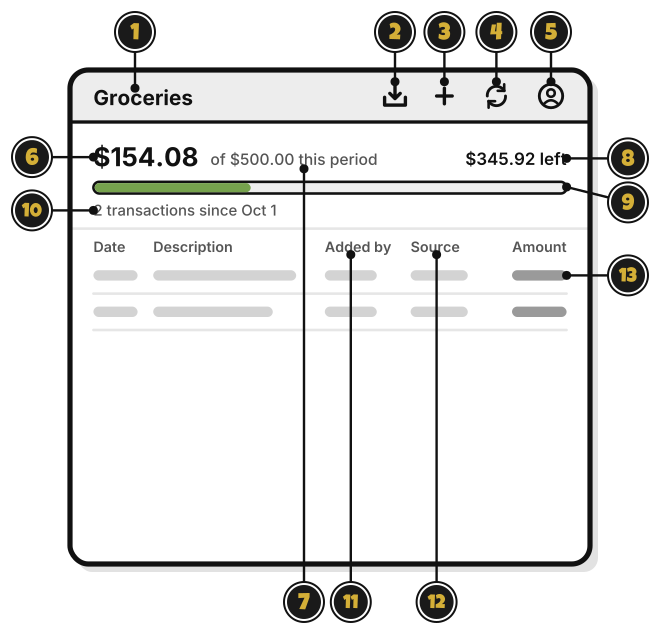
- Groceries: the budget’s name.
- Import statement, the box with an arrow pointing down: bring in a statement from your bank. Quest 6
- Add, the plus sign: add a transaction. Quest 5
- Sync, the two arrows: send and get changes now. Sync also runs on its own. It shows only when you’re signed in.
- Account, the person: your account, and signing out. Signed out, it’s Sign in.
- $154.08: what’s spent this period.
- of $500.00 this period: the budget for this period. This one starts again on the 1st.
- $345.92 left: what’s left. Over the budget, it says how far over.
- The bar: how much of the budget is spent.
- 2 transactions since Oct 1: how many transactions count this period.
- Added by: who added each transaction, in a shared group.
- Source: Manual if you typed it, Statement if it came from your bank.
- A transaction. Coming in the next update: click it to change, move or delete it.