Tour: Joining a group
A seat at the table is waiting for you.
Join a Group…, in the menu beside Add Budget, opens this window.
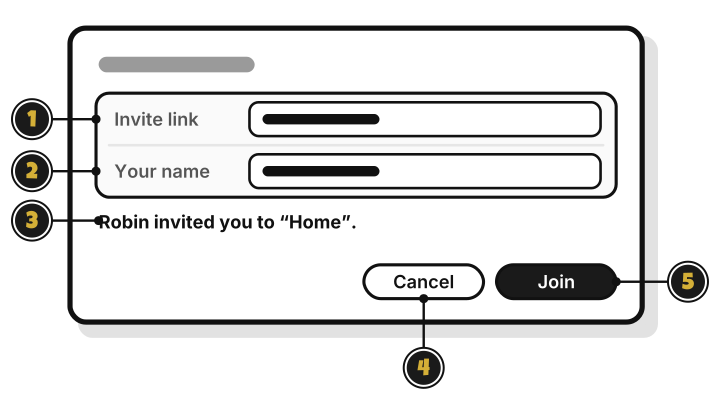
- Invite link: paste the link here.
- Your name: the name the group sees.
- The invite line: who invited you, and to which group.
- Cancel: close without joining.
- Join: join the group. Quest 8
Coming in the next update: the invitation page
On a Mac, click an invite link, and WellSpent opens this page.
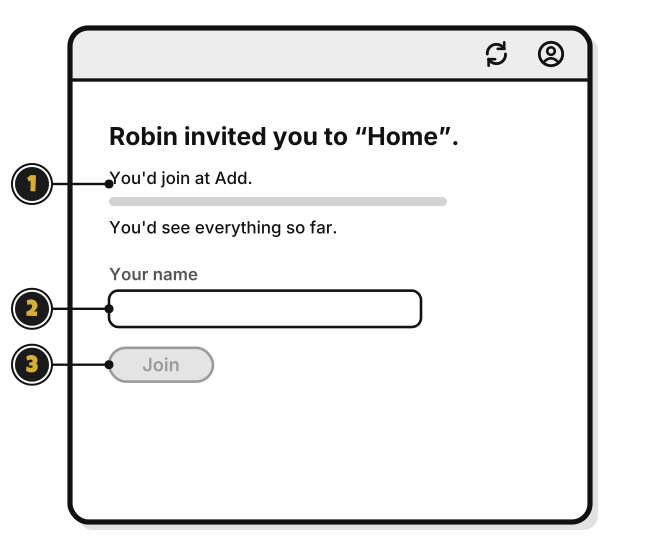
- You’d join at Add.: the level you’d have, and what you’d see.
- Your name: the name the group sees.
- Join: join the group.