Tour: A group’s page
Meet your party.
Coming in the next update: on a Mac, click a group’s name in the sidebar, or pick People… from its menu, and its page opens. Shown here as an Admin sees it.
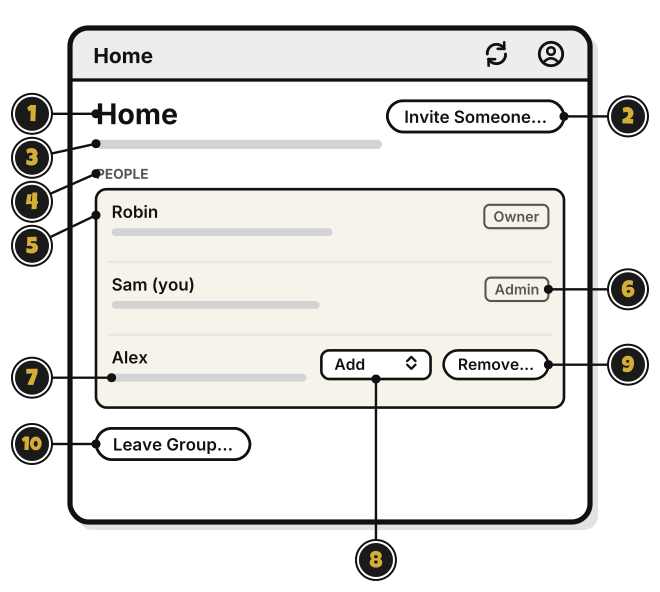
- Home: the group’s name.
- Invite Someone…: share the group. Quest 7
- The line under the name: whether it’s shared, how many people, and who made it.
- PEOPLE: everyone in the group.
- Owner: the person who made the group.
- (you): your own row, with your level as a label. It has no Remove…
- The line under a name: what that person’s level lets them do.
- The level list: change someone’s level. Only the Owner or an Admin can make someone an Admin.
- Remove…: take someone out of the group. What they added stays. It asks first.
- Leave Group…: leave the group. The others keep it. The person who made a group deletes it instead.
At the Add or View level, the page shows each person’s level as a label, with Leave Group…